A fake betting app is rarely an obvious forgery – it is usually a near-perfect clone of a platform people already recognise, with the same logo, the same colours and a name that differs by one letter. Around cricket IDs and colour-prediction games, these clones are one of the most common ways players lose money before a single bet is even settled. This breakdown covers the nine warning signs that expose a clone, why withdrawals mysteriously stop working, and exactly how to document and report one.
Table of Contents
How Clone Apps Copy Real Platforms
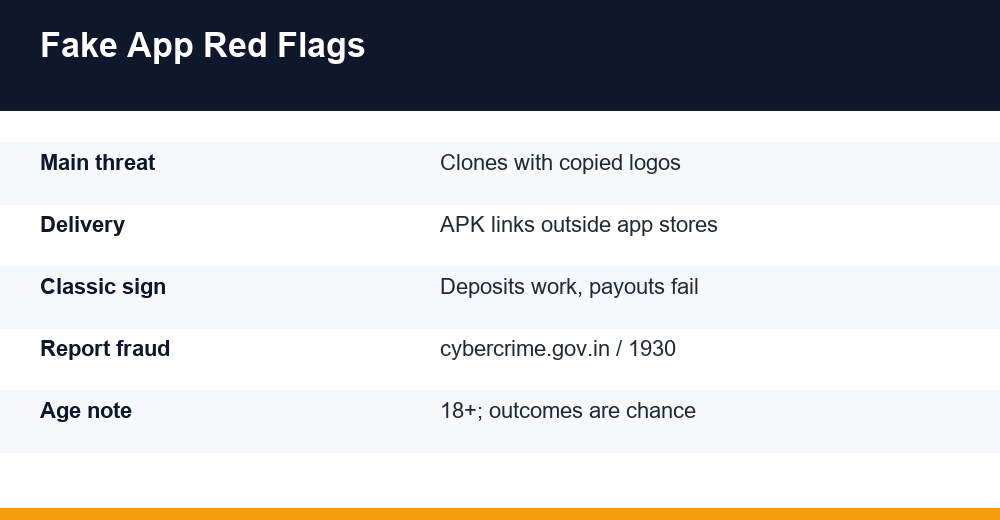
Clone apps are rarely built from scratch by a lone fraudster. Security vendors who track scams around Indian cricket seasons describe ready-made clone kits circulated through chat channels – packages that reproduce a known platform’s interface and can be deployed in days. The buyer changes the payment details and the domain, and the storefront is open.
The copying is deliberate and layered. The name mimics a recognised brand with a small spelling change or an added word like “pro”, “official” or “original”. The logo is lifted pixel-for-pixel. The colour scheme, button layout and even the promotional banners match the platform being imitated, so the clone and the original look identical at a glance.
Campaigns also borrow faces. Fabricated endorsement clips featuring cricketers or well-known creators are pushed through social ads and forwarded in groups. A familiar face appearing to recommend an app lends the clone credibility it never earned, and most viewers never check whether the clip was ever published by the person in it.
There is a second layer of mimicry that catches careful people: the support experience. Clones copy live-chat scripts, “KYC verification” wording and even complaint-redressal pages, so early interactions feel procedural and professional. Polished copy is cheap. It proves nothing about whether money can ever come back out.
This pattern sits inside a wider ecosystem. The same networks that run clone apps often run the agent-and-ID rackets described in our breakdown of the cricket ID scam playbook – the app is simply the shopfront, and the ID seller is the salesperson who walks you through the door.
- Clone kits reproduce real interfaces and are deployed in days
- Names differ by one letter or an added word such as “pro” or “vip”
- Fabricated celebrity clips manufacture fake endorsements
- Support scripts and “verification” pages are copied too
- Domains often appear shortly before a big tournament and vanish after it
One more structural tell: clones are seasonal. Fraudulent sites and apps tied to major tournaments frequently disappear once the event ends, which makes recovering funds – or even proving the app existed – far harder. A platform with no history before the season and no presence after it was never a platform at all.
9 Warning Signs of a Fake Betting App
No single sign is absolute proof, but a fake betting app almost never shows just one of these – they cluster. If three or more from this table are present, treat the app as hostile and stop any money movement immediately.
| # | Warning sign | What it looks like in practice |
|---|---|---|
| 1 | Lookalike name or logo | One letter changed, or “pro”/”original” added to a known brand |
| 2 | APK-only install | No app store listing; a download link arrives by chat or SMS |
| 3 | Very young domain | Website registered weeks ago, often just before a tournament |
| 4 | Abnormal permissions | Asks for SMS, contacts, Accessibility or device-admin access |
| 5 | Deposit works, withdrawal fails | Money in is instant; money out needs a “fee” or “verification” |
| 6 | No verifiable operator details | No registered address, no named company, no working support email |
| 7 | Pressure and urgency | Countdown bonuses, agents pushing you to deposit “before the match” |
| 8 | Impossible promises | Guaranteed wins, fixed-match claims, absurd bonus percentages |
| 9 | Payments to personal UPI handles | Deposits go to individuals’ names, not a company account |
How do I know if a betting app is fake? The two-minute check
Start with where the app came from. A real operator does not distribute its core product exclusively through forwarded installer files. Then check the developer identity: an official store listing shows the developer name, update history and support contact, while a clone either has no listing at all or a listing created days ago with no review history.
Next, compare the website the app opens against the domain named anywhere in its own text – the help pages, the footer, the terms screen. Clones frequently point somewhere else entirely, because the real domain belongs to the brand being imitated. A mismatch there ends the conversation.
Finally, weigh the promises against arithmetic. Any product claiming assured profit is describing something that does not exist: outcomes in betting and prediction games are chance events with a built-in house edge, real money is at risk, and the topic is for adults 18+ only. A clone removes even the slim mathematical chance a genuine platform leaves you.
Why You Can Deposit but Not Withdraw
The deposit-in, nothing-out pattern is the financial core of the clone model. Deposits are easy because they flow to UPI handles and bank accounts the operators control – frequently mule accounts rented from third parties. The app credits your wallet instantly because that balance is only a number in their database, not money held anywhere on your behalf.
Withdrawals fail because no payout system was ever built. Instead the app manufactures friction: the request sits in “processing”, support asks for identity re-verification, then a “withdrawal fee” or “tax clearance” appears that must be paid before funds are released. Consumer-protection guidance is blunt about this – no legitimate operator demands an upfront payment to release your own balance. Each payment made to “unlock” a withdrawal is simply another deposit.
Some people are strung along with small successful payouts first. A withdrawal of a few hundred rupees clears quickly, confidence rises, deposits grow, and then the wall comes down. That early payout was a planned cost of the fraud, not evidence of a working cashier.
The same script appears in fake trading and investment apps, where regulators have warned about accounts that display handsome profits while every cash-out attempt meets a new excuse. Recognising the shape of it matters more than recognising a particular app name, because names change weekly and the mechanics do not.
- Withdrawal request stays “pending” indefinitely
- Support invents a verification step that never completes
- A fee, tax or “account upgrade” is demanded before payout
- The account is suspended for a fabricated rule violation
- The app or agent stops responding entirely
Not every slow payout means fraud – genuine platforms also hold withdrawals for checks, and the difference matters. Our explainer on betting ID withdrawal delays walks through what ordinary processing looks like, so you can tell a queue from a trap. The decisive distinction: a real delay never asks you to send more money in order to receive money.
Permissions a Betting App Should Never Request
An app’s permission requests tell you what it intends to do to your phone. A betting or prediction app functionally needs network access and little else. Analyses of malicious sideloaded apps keep flagging the same cluster of dangerous grants that no gambling app has any business asking for.
- SMS access (read or receive) – lets an app intercept bank OTPs and transaction alerts
- Accessibility services – lets an app observe screen content and simulate taps, including in the background
- Display over other apps – enables fake screens drawn on top of a real banking app to capture PINs
- Device admin – makes an app hard to uninstall and can lock down settings
- Contacts access – harvests your contact list for the next wave of scam messages
- Notification access – exposes OTPs and alerts shown in the notification shade
- Install unknown apps – lets one bad app pull in further payloads
The SMS-plus-overlay combination is how banking malware empties accounts: the overlay captures your login, the SMS or notification permission captures the one-time password that authorises the transfer. Google’s own anti-fraud pilot, extended to India in October 2024, blocks sideloaded installs that request exactly this set – SMS read and receive, notification listener and Accessibility – because that combination is so strongly associated with financial fraud malware.
Watch for the pressure script too. Prompts such as “enable Accessibility to unlock premium features” are a documented social-engineering pattern: the feature does not exist, and the permission is the product. If an app nags you toward Settings to grant something Android itself warns about, uninstall it rather than negotiating with it.
If you have already granted these permissions, revoke them in Settings, remove any device-admin rights, uninstall the app, run a security scan, and change banking passwords from a different, clean device – not from the phone that held the app.
APK Files and Chat Links: The Delivery Pattern
Official app stores are hostile territory for fraud: listings require a developer identity, apps are scanned, and user reports get clones removed. So a fake betting app is overwhelmingly delivered as a sideloaded installer file – a raw APK sent through WhatsApp forwards, Telegram channels, social ads or SMS links.
The lures follow a template. A “VIP version” or “premium unlocked” edition supposedly unavailable on stores. A download link from the agent who just issued your ID. A pop-up on a streaming site claiming your app needs an urgent update. In every case the pitch exists to move you away from any environment where the app would be inspected.
Sideloading is not automatically malicious – developers use it legitimately, and offline tools are installed this way every day. But money handling plus store avoidance is a contradiction. An operation that wants to hold your deposits while hiding from every review process has already explained itself.
- Treat any installer link received in chat as untrusted by default
- Keep “install unknown apps” disabled for browsers and messengers
- Never install an “update” from a pop-up; real apps update through the store
- Do not re-enable a permission an app was blocked from receiving
- Be sceptical of channels pairing download links with “fixed match” claims – guaranteed-win offers are always false, because outcomes are chance
Platform safeguards help, but they trail attackers by design: each block prompts a workaround, and regional pilots reach devices unevenly. Refusing chat-delivered installers outright is the one control that does not depend on how current your phone’s protections happen to be.
Verification Checklist Before Money Moves
Run this checklist before any deposit, however small. Every step is free and takes minutes – and the whole point of clone design is to rush you past exactly these checks.
- Search the app’s exact name plus words like “complaint” or “withdrawal problem” and read what surfaces
- Check whether an official store listing exists, and read the developer name, update history and review dates
- Compare the domain the app opens against the brand it resembles, character by character
- Look up how old the website’s domain is; a platform “established for years” on a weeks-old domain is lying about its history
- Review every permission requested at install and after first launch
- Confirm deposits go to a business account, not a rotating list of personal UPI names
- Test support with a real question before any money moves – silence now means silence later
- Read the withdrawal terms for fees, thresholds or conditions that make payout practically impossible
Apply the same scrutiny to whoever sent the link. In the cricket ID world apps rarely arrive on their own: an agent or seller promotes them, and the trustworthiness of that intermediary is half the question. Our breakdown of how a cricket ID provider actually operates explains what the agent layer does and which behaviours should end the conversation.
A note on figures circulating online: claims like “most scam domains are under 30 days old” are typical patterns described by researchers, not fixed thresholds – treat specific numbers as illustrative. The direction of the signal is what matters: young domain, borrowed brand, chat-only distribution.
If even one answer feels wrong, the cost of walking away is zero. The cost of being wrong in the other direction is every rupee you deposit, and clone operators do not offer refunds.
How to Document a Suspicious App
Documentation decides whether a report goes anywhere. Clone operations vanish quickly – domains die, channels are deleted, listings are pulled – so capture evidence the moment suspicion forms, not after the app disappears.
- Screenshot the home screen, wallet page, and any withdrawal error or fee demand
- Record the exact app name, the download link you received, and the website address it opens
- Save every payment detail: UPI IDs, account names, amounts, timestamps and UTR numbers from your bank statement
- Export full chats with agents or support – do not crop, because context matters
- Note the phone numbers, chat handles and social profiles that promoted the app
- Keep the installer file if you still have it; do not reinstall it to “check”
Do not delete conversation threads in frustration, and do not warn the operators that you intend to report them. Both reactions destroy evidence or accelerate the shutdown of accounts that investigators could otherwise trace.
Organise everything into one dated folder. Banks and investigators ask for transaction references first, so UTR numbers and timestamps are the spine of the file. Screenshots of the fee demand that blocked your withdrawal are especially valuable, because they show intent rather than a mere service failure.
Where to Report a Fake Betting App
If money has already left your account, speed matters more than anything else in this article. Call 1930, India’s national helpline for financial cyber fraud, as soon as you can – it was operationalised in April 2022, replacing the earlier 155260 number, and is answered through state police. Early reporting gives banks the best chance of freezing funds while they are still traceable.
Then file a written complaint on the National Cyber Crime Reporting Portal, the Ministry of Home Affairs platform for reporting cybercrime including financial fraud. You register with your name and an Indian mobile number, confirm an OTP, and submit the incident details with evidence attached. Keep the complaint reference number the portal sends by SMS and email, since that is how you track the case afterwards.
Report in parallel to the other gatekeepers. Tell your bank or UPI provider about the specific transactions and ask what dispute process applies. If the fake betting app somehow had a store listing, flag it there so it is pulled before it reaches others, and report the channels, ads and social accounts that promoted it on those platforms directly.
| Channel | What it is for | What to have ready |
|---|---|---|
| 1930 helpline | Immediate reporting of money lost to cyber fraud | Transaction details, UTR, time of transfer |
| cybercrime.gov.in | Formal written complaint with evidence | Screenshots, links, chat exports, payment proof |
| Your bank / UPI app | Flagging and disputing the transactions | Account details, UTR numbers |
| App store / platform | Removing the listing, channel or ad | App name, link, promoter handles |
Be realistic about recovery. Losses are not always recoverable even with a perfect report, and the time spent chasing them can be heavy – but each complaint maps the network for the next takedown, so reporting is rarely wasted effort.
Look after the other cost too. Chasing a loss is stressful, and if gambling itself has stopped feeling like a free choice, help exists: Tele-MANAS, the national mental health helpline run by the Ministry of Health and Family Welfare, is free and available 24×7 on 14416 in around 20 languages. Talking to someone about that is separate from the fraud, and worth doing anyway.
Frequently Asked Questions
How do I know if a betting app is fake?
Check its origin first: clones arrive as installer links through chat apps instead of official stores. Then look for a lookalike name, a very young website domain, missing operator details, dangerous permission requests, and payments routed to personal UPI handles. Fakes show several signs together, and pressure to deposit quickly is itself a warning.
Why can I deposit on an app but not withdraw?
Because the wallet balance is only a number in the operator’s database, while your deposit went straight to accounts they control. Clones have no real payout system, so withdrawals stall behind fake verification steps, taxes or fees. Any demand to pay money in order to receive your own money is a defining fraud signal, not a processing delay.
What permissions should a betting app never ask for?
SMS access, Accessibility services, display-over-other-apps, device admin, notification access, contacts, and permission to install unknown apps. A betting app functionally needs little beyond internet access. SMS and overlay access together enable OTP theft and fake banking screens, which is how financial malware drains accounts. Refuse these grants and uninstall apps that pressure you.
Where can I report a fake betting app?
Call 1930, India’s helpline for financial cyber fraud, immediately if money was taken – early reports improve the chance of freezing funds. Then file a complaint with your evidence on the National Cyber Crime Reporting Portal at cybercrime.gov.in and keep the reference number. Also notify your bank or UPI provider and report the promoters on their platforms.